Capacity Planning
Plan, allocate, and monitor employee workloads efficiently within Odoo. Get full visibility into team capacity, prevent resource overloads, and ensure optimal work distribution across all scheduled activities.
Capacity Planning
Plan, allocate, and monitor employee workloads efficiently within Odoo. Get full visibility into team capacity, prevent resource overloads, and ensure optimal work distribution across all scheduled activities.
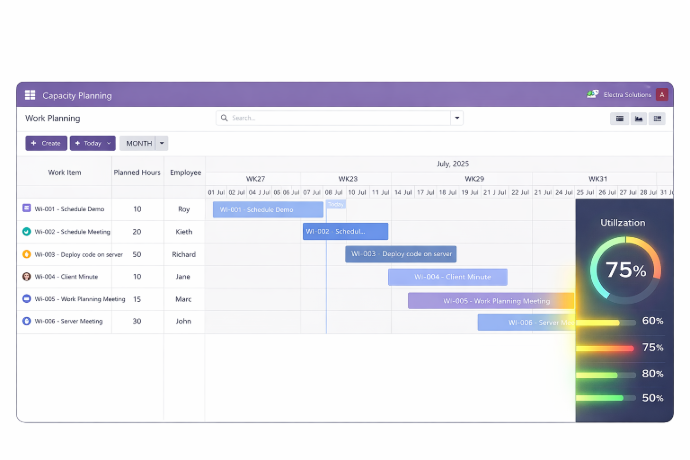
What is the Capacity Planning Module?
The Capacity Planning module enables organizations to manage workforce scheduling, resource allocation, and workload distribution efficiently within Odoo. It provides managers with clear visibility into team capacity and helps optimize work allocation to prevent overloads and idle time across all employees and departments.
- Work Overview Dashboard — View employee work plans in a card-based dashboard showing profiles, total hours, available hours, and planned hours at a glance.
- Structured Work Allocation — Create and manage employee work plans with precise task assignments and hour tracking for optimal resource utilization.
- Multiple Visualization Options — Analyze capacity data through List, Graph, Gantt, and Pivot views to match your planning and reporting needs.
- Data Integrity Validation — Built-in validation prevents invalid date entries in work plans, maintaining scheduling accuracy across the team.
- Workload Distribution Analysis — Measure total hours, available hours, and workload distribution by state and date to make informed planning decisions.
- Centralized Work Planning — Manage all employee schedules and work plans within Odoo without switching to external tools.
Whether managing project teams, operations staff, or enterprise-level departments, Capacity Planning gives workforce managers the tools to schedule smarter, allocate fairly, and monitor progress with real-time data.
What is the Capacity Planning Module?
The Capacity Planning module enables organizations to manage workforce scheduling, resource allocation, and workload distribution efficiently within Odoo. It provides managers with clear visibility into team capacity and helps optimize work allocation to prevent overloads and idle time across all employees and departments.
- Work Overview Dashboard — View employee work plans in a card-based dashboard showing profiles, total hours, available hours, and planned hours at a glance.
- Structured Work Allocation — Create and manage employee work plans with precise task assignments and hour tracking for optimal resource utilization.
- Multiple Visualization Options — Analyze capacity data through List, Graph, Gantt, and Pivot views to match your planning and reporting needs.
- Data Integrity Validation — Built-in validation prevents invalid date entries in work plans, maintaining scheduling accuracy across the team.
- Workload Distribution Analysis — Measure total hours, available hours, and workload distribution by state and date to make informed planning decisions.
- Centralized Work Planning — Manage all employee schedules and work plans within Odoo without switching to external tools.
Whether managing project teams, operations staff, or enterprise-level departments, Capacity Planning gives workforce managers the tools to schedule smarter, allocate fairly, and monitor progress with real-time data.
Why Businesses Need Capacity Planning
Without clear workforce visibility, teams face overloads, idle time, and missed deadlines. Capacity Planning brings structure and clarity to every work schedule in Odoo.
Common Challenges
No Visibility into Team Capacity
Managers have no consolidated view of who is available, overloaded, or idle — making workload distribution guesswork.
Manual Work Schedule Management
Tracking employee hours and task assignments in spreadsheets is time-consuming and prone to scheduling conflicts.
Resource Overloads & Bottlenecks
Without capacity data, key employees get overallocated while others remain underutilized — affecting delivery timelines.
Inconsistent Work Tracking
Disconnected tools and manual records make it difficult to measure planned versus actual hours across the organization.
How Capacity Planning Solves It
Visual Work Overview Dashboard
A card-based dashboard shows every employee's total hours, available hours, and planned hours for instant capacity assessment.
Structured Work Plan Allocation
Administrators create and manage work plans directly in Odoo — assigning tasks and hours with full visibility into resource availability.
Multiple Visualization Options
Switch between List, Graph, Gantt, and Pivot views to analyze capacity from different perspectives and support informed planning decisions.
Data-Driven Workload Analysis
Measure and visualize workload distribution by state and date to identify imbalances and optimize scheduling across the entire team.
Why Businesses Need Capacity Planning
Without clear workforce visibility, teams face overloads, idle time, and missed deadlines. Capacity Planning brings structure and clarity to every work schedule in Odoo.
Common Challenges
No Visibility into Team Capacity
Managers have no consolidated view of who is available, overloaded, or idle — making workload distribution guesswork.
Manual Work Schedule Management
Tracking employee hours and task assignments in spreadsheets is time-consuming and prone to scheduling conflicts.
Resource Overloads & Bottlenecks
Without capacity data, key employees get overallocated while others remain underutilized — affecting delivery timelines.
Inconsistent Work Tracking
Disconnected tools and manual records make it difficult to measure planned versus actual hours across the organization.
How Capacity Planning Solves It
Visual Work Overview Dashboard
A card-based dashboard shows every employee's total hours, available hours, and planned hours for instant capacity assessment.
Structured Work Plan Allocation
Administrators create and manage work plans directly in Odoo — assigning tasks and hours with full visibility into resource availability.
Multiple Visualization Options
Switch between List, Graph, Gantt, and Pivot views to analyze capacity from different perspectives and support informed planning decisions.
Data-Driven Workload Analysis
Measure and visualize workload distribution by state and date to identify imbalances and optimize scheduling across the entire team.
Core Features of Capacity Planning
Everything you need to plan, allocate, and monitor workforce capacity directly within Odoo
Work Overview
A dashboard displaying employee work plans in card format with user profiles, total hours, available hours, and planned hours shown graphically for quick workforce allocation assessment.
Efficient Work Allocation
Simplifies creation and management of employee work plans, allowing administrators to allocate tasks while ensuring optimal resource utilization across all team members.
Comprehensive Work Planning
Provides detailed work planning capabilities with a complete overview of employee tasks, enabling precision scheduling, task assignment, and progress monitoring across all work plans.
Versatile Visualization Options
Offers List, Graph, Gantt, and Pivot views for streamlined work plan management, data pattern analysis, and resource allocation strategy optimization to match different planning needs.
Validation Mechanism
Incorporates a validation system that prompts warnings for invalid dates, helping maintain data integrity in work plans and preventing scheduling errors before they affect operations.
Data Analysis
Enables thorough analysis of employee work plans, including measuring total hours, calculating available hours, and visualizing workload distribution based on state and date parameters.
Core Features of Capacity Planning
Everything you need to plan, allocate, and monitor workforce capacity directly within Odoo
Work Overview
A dashboard displaying employee work plans in card format with user profiles, total hours, available hours, and planned hours shown graphically for quick workforce allocation assessment.
Efficient Work Allocation
Simplifies creation and management of employee work plans, allowing administrators to allocate tasks while ensuring optimal resource utilization across all team members.
Comprehensive Work Planning
Provides detailed work planning capabilities with a complete overview of employee tasks, enabling precision scheduling, task assignment, and progress monitoring across all work plans.
Versatile Visualization Options
Offers List, Graph, Gantt, and Pivot views for streamlined work plan management, data pattern analysis, and resource allocation strategy optimization to match different planning needs.
Validation Mechanism
Incorporates a validation system that prompts warnings for invalid dates, helping maintain data integrity in work plans and preventing scheduling errors before they affect operations.
Data Analysis
Enables thorough analysis of employee work plans, including measuring total hours, calculating available hours, and visualizing workload distribution based on state and date parameters.
How to Use the Capacity Planning Module
Follow these steps to plan, allocate, and monitor employee workloads within Odoo
Install the Module
Install the Capacity Planning module from the Apps section in your Odoo instance or purchase it from the Odoo App Store.
Access Capacity Planning
Navigate to the Capacity Planning menu in Odoo to access the work planning dashboard and all planning tools.
Create Employee Work Plans
Create new work plans for employees by assigning tasks, setting start and end dates, and defining planned hours for each activity.
Review the Work Overview Dashboard
Use the Work Overview dashboard to see all employees' work plans in card format — comparing total, available, and planned hours at a glance.
Allocate Resources Efficiently
Identify over- or under-allocated employees and adjust work plan assignments to balance workloads across the team effectively.
Switch Visualization Views
Use List, Graph, Gantt, or Pivot views to analyze work plans from different perspectives and identify scheduling patterns or conflicts.
Validate Work Plan Data
The built-in validation mechanism will prompt warnings for invalid date entries — review and correct them to maintain data integrity.
Analyze Workload Distribution
Use the Data Analysis feature to measure total and available hours, then visualize workload distribution by state and date for informed planning decisions.
How to Use the Capacity Planning Module
Follow these steps to plan, allocate, and monitor employee workloads within Odoo
Install the Module
Install the Capacity Planning module from the Apps section in your Odoo instance or purchase it from the Odoo App Store.
Access Capacity Planning
Navigate to the Capacity Planning menu in Odoo to access the work planning dashboard and all planning tools.
Create Employee Work Plans
Create new work plans for employees by assigning tasks, setting start and end dates, and defining planned hours for each activity.
Review the Work Overview Dashboard
Use the Work Overview dashboard to see all employees' work plans in card format — comparing total, available, and planned hours at a glance.
Allocate Resources Efficiently
Identify over- or under-allocated employees and adjust work plan assignments to balance workloads across the team effectively.
Switch Visualization Views
Use List, Graph, Gantt, or Pivot views to analyze work plans from different perspectives and identify scheduling patterns or conflicts.
Validate Work Plan Data
The built-in validation mechanism will prompt warnings for invalid date entries — review and correct them to maintain data integrity.
Analyze Workload Distribution
Use the Data Analysis feature to measure total and available hours, then visualize workload distribution by state and date for informed planning decisions.
Versions & Documentation
Choose your Odoo version and explore interactive documentation
Versions & Documentation
Choose your Odoo version and explore interactive documentation
Frequently Asked Questions
Find answers to common questions about the Capacity Planning module
Which Odoo versions does the Capacity Planning module support?
What visualization options are available for work plans?
How does the Work Overview dashboard work?
Can I track both planned and available hours per employee?
What happens if invalid dates are entered in a work plan?
Frequently Asked Questions
Find answers to common questions about the Capacity Planning module