Odoo Advanced Gantt App for Project Module
Elevate your project planning with a structured, interactive timeline system built to enhance visibility, coordination, and execution control inside Odoo Project. Designed for growing teams and complex project environments, it empowers organizations to plan with precision and execute with confidence.
Odoo Advanced Gantt App for Project Module
Elevate your project planning with a structured, interactive timeline system built to enhance visibility, coordination, and execution control inside Odoo Project. Designed for growing teams and complex project environments, it empowers organizations to plan with precision and execute with confidence.
What is the Odoo Advanced Gantt App for Project Module?
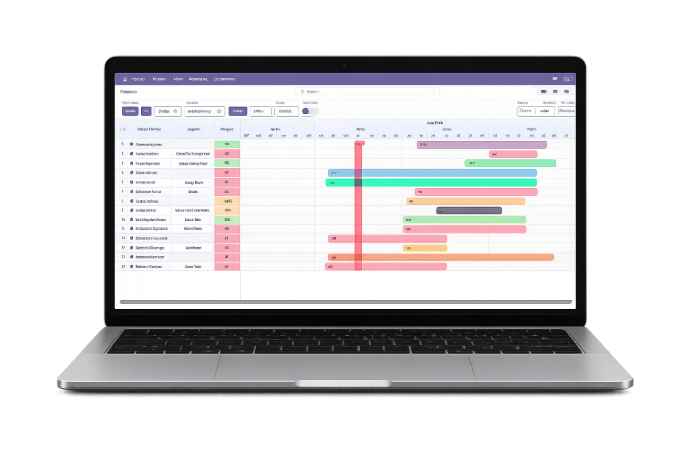
The Odoo Advanced Gantt App for Project Module is a structured timeline intelligence layer built to elevate the standard Odoo Project experience into a centralized planning and execution environment. It provides organizations with a refined visual framework that enhances coordination, improves scheduling discipline, and strengthens project governance across teams.
- Establish a centralized timeline architecture for improved cross-project visibility
- Create structured sequencing to enhance planning accuracy and milestone alignment
- Enable controlled execution adjustments within a governed timeline framework
- Provide performance transparency through visual progress representation
- Support operational clarity with organized task structuring and logical grouping
- Facilitate executive-level reporting with structured timeline outputs
- Enhance usability through adaptable interface configurations and layout flexibility
- Improve decision-making precision with focused timeframe-based project reviews
- Strengthen scheduling reliability through validation-driven timeline management
By transforming fragmented task views into a unified planning ecosystem, this module converts routine project tracking into a disciplined, data-aligned execution strategy designed for scalable growth.
What is the Odoo Advanced Gantt App for Project Module?
The Odoo Advanced Gantt App for Project Module is a structured timeline intelligence layer built to elevate the standard Odoo Project experience into a centralized planning and execution environment. It provides organizations with a refined visual framework that enhances coordination, improves scheduling discipline, and strengthens project governance across teams.
- Establish a centralized timeline architecture for improved cross-project visibility
- Create structured sequencing to enhance planning accuracy and milestone alignment
- Enable controlled execution adjustments within a governed timeline framework
- Provide performance transparency through visual progress representation
- Support operational clarity with organized task structuring and logical grouping
- Facilitate executive-level reporting with structured timeline outputs
- Enhance usability through adaptable interface configurations and layout flexibility
- Improve decision-making precision with focused timeframe-based project reviews
- Strengthen scheduling reliability through validation-driven timeline management
By transforming fragmented task views into a unified planning ecosystem, this module converts routine project tracking into a disciplined, data-aligned execution strategy designed for scalable growth.
Why Businesses Need Odoo Advanced Gantt App
Growing projects require structured timeline governance beyond basic task views.
Project Execution Challenges
Fragmented Planning
Tasks spread across views reduce coordination and make long-term tracking difficult.
Unclear Dependencies
Without structured timeline sequencing, downstream delays become harder to predict.
Limited Strategic Oversight
Managers struggle to evaluate milestone impact across multiple parallel initiatives.
Reactive Adjustments
Manual corrections often occur after issues arise rather than during planning stages.
How Advanced Gantt Addresses These Gaps
Structured Timeline Governance
Centralized timeline architecture enhances execution alignment across teams.
Predictive Planning Control
Improved sequencing reduces scheduling conflicts before they escalate.
Executive-Level Visibility
Clear milestone mapping supports strategic review and informed decisions.
Controlled Adjustment Environment
Changes occur within a structured planning framework rather than reactive fixes.
Why Businesses Need Odoo Advanced Gantt App
Growing projects require structured timeline governance beyond basic task views.
Project Execution Challenges
Fragmented Planning
Tasks spread across views reduce coordination and make long-term tracking difficult.
Unclear Dependencies
Without structured timeline sequencing, downstream delays become harder to predict.
Limited Strategic Oversight
Managers struggle to evaluate milestone impact across multiple parallel initiatives.
Reactive Adjustments
Manual corrections often occur after issues arise rather than during planning stages.
How Advanced Gantt Addresses These Gaps
Structured Timeline Governance
Centralized timeline architecture enhances execution alignment across teams.
Predictive Planning Control
Improved sequencing reduces scheduling conflicts before they escalate.
Executive-Level Visibility
Clear milestone mapping supports strategic review and informed decisions.
Controlled Adjustment Environment
Changes occur within a structured planning framework rather than reactive fixes.
Core Features of Odoo Advanced Gantt App
Powerful timeline control, intelligent scheduling, and enterprise-level project visualization.
Real-Time Task Management
Create, edit, or delete tasks directly inside the Gantt view with instant real-time updates.
Custom Views & Timeline Navigation
Switch between day, week, month, and year views with zoom controls and easy timeline navigation.
Organized & Efficient Visualization
Expand, collapse, group, filter, and favorite tasks for structured and focused project oversight.
Export & Monitor Progress
Export Gantt charts as PDF, PNG, or Excel while tracking progress with color-coded percentage indicators.
Dynamic Resource Allocation
Assign and manage resources directly within the Gantt chart using intuitive drag-and-drop controls.
Flexible Scheduling & Adjustments
Instantly reschedule tasks with drag-and-drop adjustments and built-in validation controls.
Full-Screen & Static Modes
Use full-screen mode for immersive planning or enable static mode for secure read-only review.
Data Filtering & Refinement
Apply advanced sorting, filtering, and facet filters based on assignee, status, priority, or date range.
Visual & UI Customization
Personalize themes, colors, and interface elements to match organizational workflow preferences.
Instant Task Insights & Visual Clarity
View detailed tooltips, display labels, and customize the “Today” marker for enhanced timeline clarity.
Custom Date Range Filter
Define specific timeframes to analyze historical data or plan future project execution efficiently.
Intuitive Editing and Deletion of Entries
Double-click timeline entries to edit instantly or use quick action buttons for streamlined updates.
Core Features of Odoo Advanced Gantt App
Powerful timeline control, intelligent scheduling, and enterprise-level project visualization.
Real-Time Task Management
Create, edit, or delete tasks directly inside the Gantt view with instant real-time updates.
Custom Views & Timeline Navigation
Switch between day, week, month, and year views with zoom controls and easy timeline navigation.
Organized & Efficient Visualization
Expand, collapse, group, filter, and favorite tasks for structured and focused project oversight.
Export & Monitor Progress
Export Gantt charts as PDF, PNG, or Excel while tracking progress with color-coded percentage indicators.
Dynamic Resource Allocation
Assign and manage resources directly within the Gantt chart using intuitive drag-and-drop controls.
Flexible Scheduling & Adjustments
Instantly reschedule tasks with drag-and-drop adjustments and built-in validation controls.
Full-Screen & Static Modes
Use full-screen mode for immersive planning or enable static mode for secure read-only review.
Data Filtering & Refinement
Apply advanced sorting, filtering, and facet filters based on assignee, status, priority, or date range.
Visual & UI Customization
Personalize themes, colors, and interface elements to match organizational workflow preferences.
Instant Task Insights & Visual Clarity
View detailed tooltips, display labels, and customize the “Today” marker for enhanced timeline clarity.
Custom Date Range Filter
Define specific timeframes to analyze historical data or plan future project execution efficiently.
Intuitive Editing and Deletion of Entries
Double-click timeline entries to edit instantly or use quick action buttons for streamlined updates.
How to Use the Odoo Advanced Gantt App
Follow a structured workflow to activate advanced timeline planning.
Install the Module
Install the app from the Odoo Apps menu and activate it inside the Project module.
Access Timeline View
Open your project and switch to the enhanced Gantt interface.
Structure Project Phases
Organize tasks into logical sequences aligned with milestones.
Refine Scheduling
Adjust timeframes and align deliverables with operational capacity.
Review Alignment
Validate sequencing to ensure strategic consistency.
Apply Filters
Focus on relevant task groups for targeted review.
Monitor Execution
Track timeline movement and milestone completion status.
Export When Needed
Generate structured documentation for reporting or stakeholder review.
How to Use the Odoo Advanced Gantt App
Follow a structured workflow to activate advanced timeline planning.
Install the Module
Install the app from the Odoo Apps menu and activate it inside the Project module.
Access Timeline View
Open your project and switch to the enhanced Gantt interface.
Structure Project Phases
Organize tasks into logical sequences aligned with milestones.
Refine Scheduling
Adjust timeframes and align deliverables with operational capacity.
Review Alignment
Validate sequencing to ensure strategic consistency.
Apply Filters
Focus on relevant task groups for targeted review.
Monitor Execution
Track timeline movement and milestone completion status.
Export When Needed
Generate structured documentation for reporting or stakeholder review.
Versions & Documentation
Select your Odoo version to explore interactive documentation and access the module
Versions & Documentation
Select your Odoo version to explore interactive documentation and access the module
Frequently Asked Questions
Important clarifications about the Odoo Advanced Gantt App
Which Odoo versions are supported?
Does this modify core Odoo functionality?
Is it suitable for large project environments?
Can executives use it for strategic review?
Does it require technical configuration?
Frequently Asked Questions
Important clarifications about the Odoo Advanced Gantt App