Odoo Mailchimp Connector
Seamlessly connect Odoo with Mailchimp to manage email campaigns, sync contacts, import audience lists, and monitor campaign performance — all from a single centralized Odoo interface without switching between platforms.
Odoo Mailchimp Connector
Seamlessly connect Odoo with Mailchimp to manage email campaigns, sync contacts, import audience lists, and monitor campaign performance — all from a single centralized Odoo interface without switching between platforms.
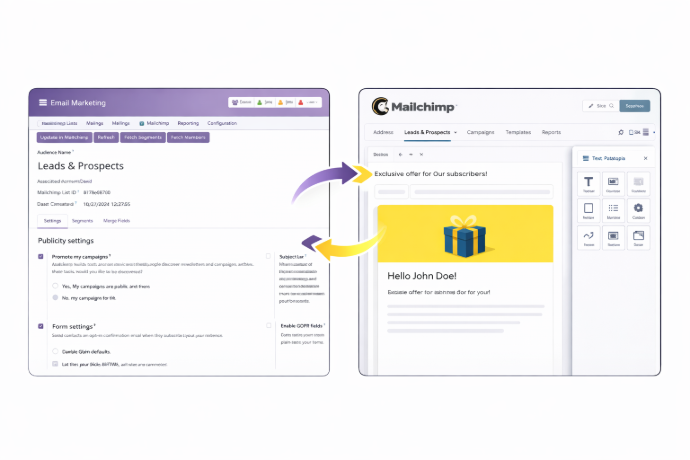
What is the Odoo Mailchimp Connector Module?
The Odoo Mailchimp Connector bridges your Odoo ERP with Mailchimp's powerful email marketing platform, enabling seamless bidirectional data flow between both systems. It eliminates the need to manage contacts, campaigns, and audience lists in separate tools — everything runs directly within Odoo.
- Multi-Account Management — Connect multiple Mailchimp accounts to a single Odoo instance via API keys for unified control.
- Contact Synchronization — Import, export, and update member contacts with full control over subscription statuses.
- Campaign Lifecycle Control — Create, update, export, and send Mailchimp campaigns without leaving Odoo.
- Audience List & Segment Management — Sync audience lists and segments from Mailchimp into Odoo for centralized targeting.
- Email Template Reuse — Import Mailchimp templates into Odoo to maintain consistent campaign design across sends.
- Performance Monitoring — Track campaign status, delivery metrics, and lifecycle progress from within Odoo.
Whether running targeted marketing campaigns, managing large subscriber bases, or tracking email performance, the Odoo Mailchimp Connector gives marketing teams a unified workspace to execute all Mailchimp operations without ever leaving Odoo.
What is the Odoo Mailchimp Connector Module?
The Odoo Mailchimp Connector bridges your Odoo ERP with Mailchimp's powerful email marketing platform, enabling seamless bidirectional data flow between both systems. It eliminates the need to manage contacts, campaigns, and audience lists in separate tools — everything runs directly within Odoo.
- Multi-Account Management — Connect multiple Mailchimp accounts to a single Odoo instance via API keys for unified control.
- Contact Synchronization — Import, export, and update member contacts with full control over subscription statuses.
- Campaign Lifecycle Control — Create, update, export, and send Mailchimp campaigns without leaving Odoo.
- Audience List & Segment Management — Sync audience lists and segments from Mailchimp into Odoo for centralized targeting.
- Email Template Reuse — Import Mailchimp templates into Odoo to maintain consistent campaign design across sends.
- Performance Monitoring — Track campaign status, delivery metrics, and lifecycle progress from within Odoo.
Whether running targeted marketing campaigns, managing large subscriber bases, or tracking email performance, the Odoo Mailchimp Connector gives marketing teams a unified workspace to execute all Mailchimp operations without ever leaving Odoo.
Why Businesses Need Odoo Mailchimp Connector
Managing email marketing and CRM data across disconnected platforms wastes time and creates data inconsistencies. The Odoo Mailchimp Connector keeps everything in sync.
Common Challenges
Manual Contact Management
Exporting and importing contacts between Odoo and Mailchimp manually leads to outdated lists and costly errors.
Scattered Campaign Data
Campaign performance metrics stay locked in Mailchimp while customer data lives in Odoo — creating an incomplete picture.
Multiple Account Overhead
Managing several Mailchimp accounts requires repeated platform logins and separate tracking, reducing productivity.
Duplicate Data Entry
Creating and updating campaigns on both platforms separately wastes time and introduces inconsistencies across teams.
How Our Connector Solves It
Automated Contact Sync
Import and export contacts automatically between Odoo and Mailchimp, keeping subscription statuses accurate and lists always current.
Centralized Campaign Visibility
Access campaign content, recipient lists, analytics, and delivery status directly within Odoo for complete marketing oversight.
Multi-Account in One Interface
Connect and manage multiple Mailchimp accounts from a single Odoo session — no platform switching required.
End-to-End Campaign Management
Design, export, and send Mailchimp campaigns from Odoo, eliminating duplicate work and keeping both platforms synchronized.
Why Businesses Need Odoo Mailchimp Connector
Managing email marketing and CRM data across disconnected platforms wastes time and creates data inconsistencies. The Odoo Mailchimp Connector keeps everything in sync.
Common Challenges
Manual Contact Management
Exporting and importing contacts between Odoo and Mailchimp manually leads to outdated lists and costly errors.
Scattered Campaign Data
Campaign performance metrics stay locked in Mailchimp while customer data lives in Odoo — creating an incomplete picture.
Multiple Account Overhead
Managing several Mailchimp accounts requires repeated platform logins and separate tracking, reducing productivity.
Duplicate Data Entry
Creating and updating campaigns on both platforms separately wastes time and introduces inconsistencies across teams.
How Our Connector Solves It
Automated Contact Sync
Import and export contacts automatically between Odoo and Mailchimp, keeping subscription statuses accurate and lists always current.
Centralized Campaign Visibility
Access campaign content, recipient lists, analytics, and delivery status directly within Odoo for complete marketing oversight.
Multi-Account in One Interface
Connect and manage multiple Mailchimp accounts from a single Odoo session — no platform switching required.
End-to-End Campaign Management
Design, export, and send Mailchimp campaigns from Odoo, eliminating duplicate work and keeping both platforms synchronized.
Core Features of the Odoo Mailchimp Connector
Everything you need to manage Mailchimp campaigns, contacts, and accounts from within Odoo
Sync multiple Mailchimp accounts in Odoo
Connect and manage multiple Mailchimp accounts simultaneously within Odoo by linking each via its API key — eliminating the need to switch between platforms for different accounts.
Execute Mailchimp Operations
Perform bulk import operations — including lists, templates, and campaigns — for multiple Mailchimp accounts simultaneously without repetitive individual imports.
Import Lists from Mailchimp to Odoo
Synchronize Mailchimp audience lists from multiple accounts into Odoo, providing a centralized platform to manage and target all subscriber audiences from one location.
Bi-directional settings Synchronization
All Mailchimp account settings are integrated into Odoo, allowing administrators to configure and manage settings directly from the Odoo interface without accessing Mailchimp separately.
Fetch Member contacts from Mailchimp
Import member contacts from Mailchimp into Odoo with automatic categorization by subscription status — subscribed, unsubscribed, or other types — for accurate list segmentation.
Export/update member contacts to Mailchimp
Create, update, and export member contacts from Odoo directly to Mailchimp — including editing subscription status and other crucial contact details to maintain consistent audience data.
Segments/Merge fields management
Synchronize audience segments and merge fields from Mailchimp to Odoo using action buttons, maintaining precise audience targeting and consistent custom field data across both platforms.
Import Templates from Mailchimp
Import Mailchimp email templates directly into Odoo for consistent campaign design and reusability across multiple sends without recreating layouts from scratch.
Import Mailchimp Campaigns in Odoo
Bring Mailchimp campaigns into Odoo to access key campaign details — content, recipient lists, and analytics — within a single interface for streamlined review and planning.
Create/Update, Export Campaigns from Odoo
Design new campaigns and modify existing ones directly in Odoo, then export them seamlessly to Mailchimp — keeping campaign content synchronized between both platforms at all times.
Send Campaign Mails from Odoo
Manage campaign recipients, select target audience segments, and initiate Mailchimp campaign delivery directly from Odoo without switching to the Mailchimp dashboard.
Monitor Campaign details and Status
Track the full campaign lifecycle — from draft to sending to sent — and monitor delivery metrics including the number of recipients who received the email, all from within Odoo.
Core Features of the Odoo Mailchimp Connector
Everything you need to manage Mailchimp campaigns, contacts, and accounts from within Odoo
Sync multiple Mailchimp accounts in Odoo
Connect and manage multiple Mailchimp accounts simultaneously within Odoo by linking each via its API key — eliminating the need to switch between platforms for different accounts.
Execute Mailchimp Operations
Perform bulk import operations — including lists, templates, and campaigns — for multiple Mailchimp accounts simultaneously without repetitive individual imports.
Import Lists from Mailchimp to Odoo
Synchronize Mailchimp audience lists from multiple accounts into Odoo, providing a centralized platform to manage and target all subscriber audiences from one location.
Bi-directional settings Synchronization
All Mailchimp account settings are integrated into Odoo, allowing administrators to configure and manage settings directly from the Odoo interface without accessing Mailchimp separately.
Fetch Member contacts from Mailchimp
Import member contacts from Mailchimp into Odoo with automatic categorization by subscription status — subscribed, unsubscribed, or other types — for accurate list segmentation.
Export/update member contacts to Mailchimp
Create, update, and export member contacts from Odoo directly to Mailchimp — including editing subscription status and other crucial contact details to maintain consistent audience data.
Segments/Merge fields management
Synchronize audience segments and merge fields from Mailchimp to Odoo using action buttons, maintaining precise audience targeting and consistent custom field data across both platforms.
Import Templates from Mailchimp
Import Mailchimp email templates directly into Odoo for consistent campaign design and reusability across multiple sends without recreating layouts from scratch.
Import Mailchimp Campaigns in Odoo
Bring Mailchimp campaigns into Odoo to access key campaign details — content, recipient lists, and analytics — within a single interface for streamlined review and planning.
Create/Update, Export Campaigns from Odoo
Design new campaigns and modify existing ones directly in Odoo, then export them seamlessly to Mailchimp — keeping campaign content synchronized between both platforms at all times.
Send Campaign Mails from Odoo
Manage campaign recipients, select target audience segments, and initiate Mailchimp campaign delivery directly from Odoo without switching to the Mailchimp dashboard.
Monitor Campaign details and Status
Track the full campaign lifecycle — from draft to sending to sent — and monitor delivery metrics including the number of recipients who received the email, all from within Odoo.
How to Use the Odoo Mailchimp Connector
Follow these steps to connect Odoo with Mailchimp and manage your email marketing operations
Install the Module
Install the Odoo Mailchimp Connector from the Apps section in your Odoo instance or purchase it from the Odoo App Store.
Add Mailchimp API Key
Navigate to the Mailchimp settings in Odoo and add your Mailchimp account API key to establish a secure connection between platforms.
Execute Import Operations
Use the Execute Mailchimp Operations feature to perform bulk imports of lists, templates, and campaigns from all connected accounts at once.
Sync Audience Lists & Segments
Import Mailchimp audience lists and synchronize segments and merge fields into Odoo for centralized audience management and targeting.
Manage Member Contacts
Fetch member contacts from Mailchimp into Odoo, then create or update contacts and export changes back to Mailchimp to keep both systems in sync.
Import Templates
Bring your Mailchimp email templates into Odoo for reuse across campaigns, ensuring consistent branding and reducing design repetition.
Create & Export Campaigns
Design new campaigns in Odoo or import existing ones from Mailchimp. Update content, assign recipients, and export campaigns back to Mailchimp when ready.
Send & Monitor Campaigns
Send campaign emails directly from Odoo and track delivery status, lifecycle stage, and recipient metrics — all from a single interface.
How to Use the Odoo Mailchimp Connector
Follow these steps to connect Odoo with Mailchimp and manage your email marketing operations
Install the Module
Install the Odoo Mailchimp Connector from the Apps section in your Odoo instance or purchase it from the Odoo App Store.
Add Mailchimp API Key
Navigate to the Mailchimp settings in Odoo and add your Mailchimp account API key to establish a secure connection between platforms.
Execute Import Operations
Use the Execute Mailchimp Operations feature to perform bulk imports of lists, templates, and campaigns from all connected accounts at once.
Sync Audience Lists & Segments
Import Mailchimp audience lists and synchronize segments and merge fields into Odoo for centralized audience management and targeting.
Manage Member Contacts
Fetch member contacts from Mailchimp into Odoo, then create or update contacts and export changes back to Mailchimp to keep both systems in sync.
Import Templates
Bring your Mailchimp email templates into Odoo for reuse across campaigns, ensuring consistent branding and reducing design repetition.
Create & Export Campaigns
Design new campaigns in Odoo or import existing ones from Mailchimp. Update content, assign recipients, and export campaigns back to Mailchimp when ready.
Send & Monitor Campaigns
Send campaign emails directly from Odoo and track delivery status, lifecycle stage, and recipient metrics — all from a single interface.
Versions & Documentation
Choose your Odoo version and explore interactive documentation
Versions & Documentation
Choose your Odoo version and explore interactive documentation
Frequently Asked Questions
Find answers to common questions about the Odoo Mailchimp Connector
Which Odoo versions are supported?
Can I connect multiple Mailchimp accounts to one Odoo instance?
What data is synchronized between Odoo and Mailchimp?
Can I create and send campaigns directly from Odoo?
How are subscription statuses handled during contact sync?
Frequently Asked Questions
Find answers to common questions about the Odoo Mailchimp Connector