Odoo Power BI Connector
Connect your Odoo ERP with Microsoft Power BI to centralize business data, improve reporting accuracy, and transform operational information into strategic insights through secure and scalable business intelligence integration.
Odoo Power BI Connector
Connect your Odoo ERP with Microsoft Power BI to centralize business data, improve reporting accuracy, and transform operational information into strategic insights through secure and scalable business intelligence integration.
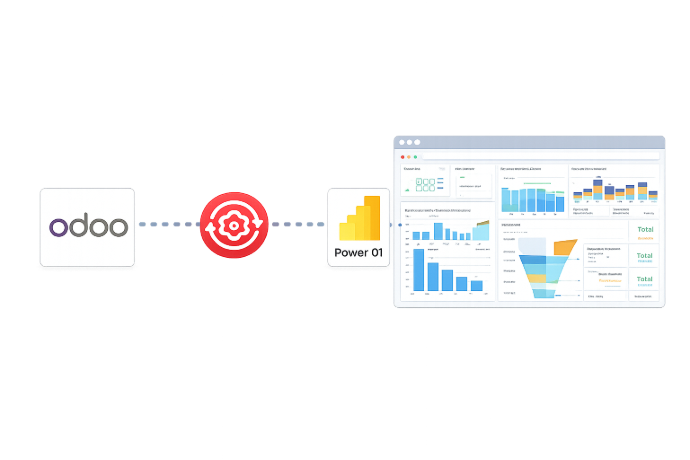
What is the Odoo Power BI Connector Module?
The Odoo Power BI Connector is a business intelligence integration module that links Odoo ERP with Microsoft Power BI for structured data reporting and analytics management. It enables organizations to extract, organize, and publish ERP data into Power BI environments with centralized governance and enterprise-level control.
- Integrate multiple Odoo instances into a centralized Power BI reporting framework.
- Secure data exchange through authenticated API-based integration architecture.
- Support scalable data processing for growing business and large datasets.
- Automatically structure ERP data into BI-ready tables for advanced analytics.
- Enable enterprise-level reporting across finance, sales, HR, inventory, and operations.
- Enable enterprise-level reporting across finance, sales, HR, inventory, and operations.
- Empower leadership with actionable insights derived from real-time operational data.
By combining Odoo’s operational capabilities with Power BI’s advanced analytics engine, the connector empowers businesses with complete visibility, faster reporting, and data-driven strategies that drive growth and performance.
What is the Odoo Power BI Connector Module?
The Odoo Power BI Connector is a business intelligence integration module that links Odoo ERP with Microsoft Power BI for structured data reporting and analytics management. It enables organizations to extract, organize, and publish ERP data into Power BI environments with centralized governance and enterprise-level control.
- Integrate multiple Odoo instances into a centralized Power BI reporting framework.
- Secure data exchange through authenticated API-based integration architecture.
- Support scalable data processing for growing business and large datasets.
- Automatically structure ERP data into BI-ready tables for advanced analytics.
- Enable enterprise-level reporting across finance, sales, HR, inventory, and operations.
- Enable enterprise-level reporting across finance, sales, HR, inventory, and operations.
- Empower leadership with actionable insights derived from real-time operational data.
By combining Odoo’s operational capabilities with Power BI’s advanced analytics engine, the connector empowers businesses with complete visibility, faster reporting, and data-driven strategies that drive growth and performance.
Why Businesses Need Odoo Power BI Connector
Stop wasting time on manual exports and disconnected systems. Our Odoo Power BI Connector simplifies reporting and delivers real-time insights.
Common Reporting Challenges
Lack of Executive Visibility
Leadership teams struggle to access a unified performance overview across finance, sales, and operations in one consolidated view.
Decision-Making Delays
Strategic decisions are often postponed because reliable and consolidated business insights are not instantly available.
Limited Cross-Department Alignment
Departments rely on isolated reports, making it difficult to evaluate overall company performance accurately.
Reactive Instead of Proactive Planning
Without structured analytics, businesses tend to respond to issues after they occur instead of anticipating trends early.
How the Odoo Power BI Connector Solves It
Company-Wide Performance Transparency
Gain clear organization-level visibility into financial, operational, and sales performance within a unified analytical environment.
Faster Strategic Decisions
Empower executives with intuitive dashboards that convert complex operational data into actionable business insights.
Stronger Departmental Alignment
Ensure all teams rely on centralized, standardized data to improve coordination and performance tracking.
Data-Driven Growth Planning
Use structured analytics to identify trends, optimize resources, and support sustainable long-term business expansion.
Why Businesses Need Odoo Power BI Connector
Stop wasting time on manual exports and disconnected systems. Our Odoo Power BI Connector simplifies reporting and delivers real-time insights.
Common Reporting Challenges
Lack of Executive Visibility
Leadership teams struggle to access a unified performance overview across finance, sales, and operations in one consolidated view.
Decision-Making Delays
Strategic decisions are often postponed because reliable and consolidated business insights are not instantly available.
Limited Cross-Department Alignment
Departments rely on isolated reports, making it difficult to evaluate overall company performance accurately.
Reactive Instead of Proactive Planning
Without structured analytics, businesses tend to respond to issues after they occur instead of anticipating trends early.
How the Odoo Power BI Connector Solves It
Company-Wide Performance Transparency
Gain clear organization-level visibility into financial, operational, and sales performance within a unified analytical environment.
Faster Strategic Decisions
Empower executives with intuitive dashboards that convert complex operational data into actionable business insights.
Stronger Departmental Alignment
Ensure all teams rely on centralized, standardized data to improve coordination and performance tracking.
Data-Driven Growth Planning
Use structured analytics to identify trends, optimize resources, and support sustainable long-term business expansion.
Core Features of the Odoo Power BI Connector
Everything you need to connect, sync, and visualize your Odoo data in Power BI
Multi-Instance Integration
Connect multiple Odoo instances to Power BI and analyze consolidated data.
One-Click Workspace Creation
Create or import Power BI workspaces instantly with a single click.
One-Click Dataset Creation
Build datasets with tables in seconds, no technical complexity.
Model-Agnostic Data Upload
Upload data from any Odoo model without restrictions.
Domain-Based Filtering
Upload only relevant records using advanced domain filters.
Effortless Data Upload
Push updated data anytime to keep dashboards current.
Import Dashboards & Reports
Bring Power BI dashboards directly into Odoo interface.
Scheduled Publishing
Automate dataset refresh cycles for always-updated insights.
Core Features of the Odoo Power BI Connector
Everything you need to connect, sync, and visualize your Odoo data in Power BI
Multi-Instance Integration
Connect multiple Odoo instances to Power BI and analyze consolidated data.
One-Click Workspace Creation
Create or import Power BI workspaces instantly with a single click.
One-Click Dataset Creation
Build datasets with tables in seconds, no technical complexity.
Model-Agnostic Data Upload
Upload data from any Odoo model without restrictions.
Domain-Based Filtering
Upload only relevant records using advanced domain filters.
Effortless Data Upload
Push updated data anytime to keep dashboards current.
Import Dashboards & Reports
Bring Power BI dashboards directly into Odoo interface.
Scheduled Publishing
Automate dataset refresh cycles for always-updated insights.
How to Use the Odoo Power BI Connector
Follow these eight steps to seamlessly integrate Odoo with Power BI
Install Module
Install the Odoo Power BI Connector from the Apps section in your Odoo instance.
Configure Instance
Set up your Power BI credentials and configure connection instances with Microsoft authentication.
Create Workspace
Create Power BI workspaces directly from Odoo with a single click publish functionality.
Add Datasets
Generate datasets within your workspace to organize your data structure and publish it to Power BI in just one click.
Create Tables
Define tables in your datasets mapped to Odoo models (e.g., Sales, Customers, Inventory).
Update & Upload
Push table and data from any Odoo model to Power BI tables.
Schedule Sync
Configure automated actions to publish records periodically and keep data updated.
View Reports & Dashboards
Access and manage Power BI dashboards and reports directly within Odoo interface with import functionality.
How to Use the Odoo Power BI Connector
Follow these eight steps to seamlessly integrate Odoo with Power BI
Install Module
Install the Odoo Power BI Connector from the Apps section in your Odoo instance.
Configure Instance
Set up your Power BI credentials and configure connection instances with Microsoft authentication.
Create Workspace
Create Power BI workspaces directly from Odoo with a single click publish functionality.
Add Datasets
Generate datasets within your workspace to organize your data structure and publish it to Power BI in just one click.
Create Tables
Define tables in your datasets mapped to Odoo models (e.g., Sales, Customers, Inventory).
Update & Upload
Push table and data from any Odoo model to Power BI tables.
Schedule Sync
Configure automated actions to publish records periodically and keep data updated.
View Reports & Dashboards
Access and manage Power BI dashboards and reports directly within Odoo interface with import functionality.
Versions & Documentation
Choose your Odoo version and explore interactive documentation
Versions & Documentation
Choose your Odoo version and explore interactive documentation
Frequently Asked Questions
Find answers to common questions about the connector
Which Odoo versions are supported?
Who is this connector designed for?
Can I connect multiple Odoo instances?
How does data synchronization work?
Frequently Asked Questions
Find answers to common questions about the connector