Odoo Shopify Connector
The Odoo Shopify Connector automates the synchronization of products, orders, and customers between your Odoo ERP and Shopify store — eliminating manual data entry and keeping your e-commerce operations perfectly aligned in real time.
Odoo Shopify Connector
The Odoo Shopify Connector automates the synchronization of products, orders, and customers between your Odoo ERP and Shopify store — eliminating manual data entry and keeping your e-commerce operations perfectly aligned in real time.
What is the Shopify Connector Module?
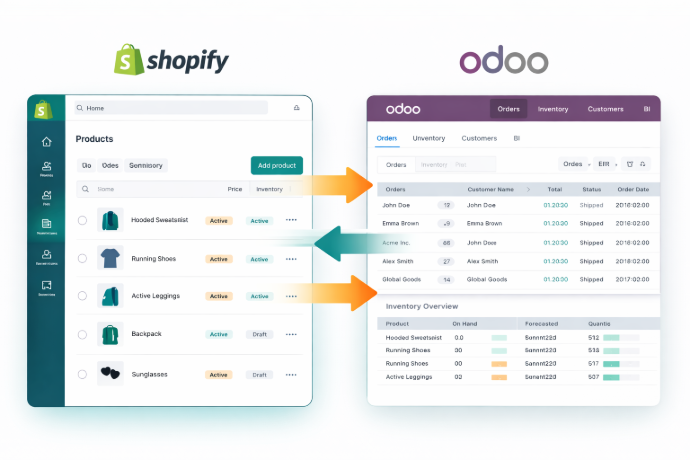
The Odoo Shopify Connector is a comprehensive e-commerce integration module that creates a seamless two-way bridge between your Odoo ERP and Shopify store. It automates the flow of products, orders, and customer data between both platforms — transforming your operations from manual and fragmented to fully synchronized and centrally managed.
- Multi-Store Management — Connect and manage multiple Shopify stores from a single Odoo instance for complete e-commerce control.
- Two-Way Product Sync — Keep product listings automatically aligned between Odoo and Shopify in both directions.
- Automatic Order Processing — Orders placed in Shopify flow instantly into Odoo, eliminating manual order entry and reducing processing delays.
- Customer Data Consistency — Customer records stay synchronized across both platforms so your CRM and e-commerce data always match.
- Real-Time Analytics Dashboard — Monitor product sales, order volumes, and customer trends from a single, intuitive dashboard inside Odoo.
- Centralized E-Commerce Operations — Manage your entire Shopify presence from within Odoo — no need to switch between platforms for routine tasks.
Whether you operate a single Shopify store or a multi-brand e-commerce business, the Odoo Shopify Connector gives your team the unified operational control needed to scale efficiently and deliver consistently excellent customer experiences.
What is the Shopify Connector Module?
The Odoo Shopify Connector is a comprehensive e-commerce integration module that creates a seamless two-way bridge between your Odoo ERP and Shopify store. It automates the flow of products, orders, and customer data between both platforms — transforming your operations from manual and fragmented to fully synchronized and centrally managed.
- Multi-Store Management — Connect and manage multiple Shopify stores from a single Odoo instance for complete e-commerce control.
- Two-Way Product Sync — Keep product listings automatically aligned between Odoo and Shopify in both directions.
- Automatic Order Processing — Orders placed in Shopify flow instantly into Odoo, eliminating manual order entry and reducing processing delays.
- Customer Data Consistency — Customer records stay synchronized across both platforms so your CRM and e-commerce data always match.
- Real-Time Analytics Dashboard — Monitor product sales, order volumes, and customer trends from a single, intuitive dashboard inside Odoo.
- Centralized E-Commerce Operations — Manage your entire Shopify presence from within Odoo — no need to switch between platforms for routine tasks.
Whether you operate a single Shopify store or a multi-brand e-commerce business, the Odoo Shopify Connector gives your team the unified operational control needed to scale efficiently and deliver consistently excellent customer experiences.
Why Businesses Need the Odoo Shopify Connector
Running Shopify and Odoo separately creates data gaps and operational drag. Our connector eliminates the divide and automates your entire e-commerce workflow.
Common Challenges
Manual Order Entry
Shopify orders must be manually re-entered into Odoo, creating delays, errors, and unnecessary overhead for your operations team.
Inventory Mismatches
Without automatic sync, stock levels in Odoo and Shopify fall out of alignment — leading to overselling or missed reorder triggers.
Fragmented Customer Data
Customer information stored separately in Shopify and Odoo creates duplicate records and inconsistent CRM data.
Disconnected Reporting
E-commerce metrics and ERP data live in separate systems, making it difficult to get a unified view of business performance.
How Our Connector Solves It
Automated Order Synchronization
Shopify orders flow automatically into Odoo in real time — zero manual entry, zero processing delay.
Bidirectional Product & Inventory Sync
Products and stock levels stay perfectly aligned between Odoo and Shopify in both directions, preventing overselling.
Unified Customer Records
Customer data is synchronized bidirectionally, keeping your CRM and Shopify customer profiles consistently up to date.
Centralized Analytics Dashboard
Monitor all your key Shopify metrics from inside Odoo with a clean, real-time dashboard — one platform, full visibility.
Why Businesses Need the Odoo Shopify Connector
Running Shopify and Odoo separately creates data gaps and operational drag. Our connector eliminates the divide and automates your entire e-commerce workflow.
Common Challenges
Manual Order Entry
Shopify orders must be manually re-entered into Odoo, creating delays, errors, and unnecessary overhead for your operations team.
Inventory Mismatches
Without automatic sync, stock levels in Odoo and Shopify fall out of alignment — leading to overselling or missed reorder triggers.
Fragmented Customer Data
Customer information stored separately in Shopify and Odoo creates duplicate records and inconsistent CRM data.
Disconnected Reporting
E-commerce metrics and ERP data live in separate systems, making it difficult to get a unified view of business performance.
How Our Connector Solves It
Automated Order Synchronization
Shopify orders flow automatically into Odoo in real time — zero manual entry, zero processing delay.
Bidirectional Product & Inventory Sync
Products and stock levels stay perfectly aligned between Odoo and Shopify in both directions, preventing overselling.
Unified Customer Records
Customer data is synchronized bidirectionally, keeping your CRM and Shopify customer profiles consistently up to date.
Centralized Analytics Dashboard
Monitor all your key Shopify metrics from inside Odoo with a clean, real-time dashboard — one platform, full visibility.
Core Features of the Odoo Shopify Connector
Everything you need to integrate, synchronize, and manage your Shopify store from Odoo
Support for Multiple Shopify Store Connections
Easily integrate and manage multiple Shopify stores from a single Odoo instance — centralizing your entire e-commerce portfolio under one operational platform.
Advanced and Intuitive Dashboard
Gain real-time insights into key metrics such as product sales, order volumes, and customer data — all from a clean, actionable Odoo dashboard.
Bidirectional Customer Synchronization
Customer data is consistently updated between Odoo and Shopify in both directions — ensuring your CRM and e-commerce profiles always stay in sync.
Bidirectional Product Synchronization
Products are kept synchronized between Shopify and Odoo in real time — ensuring listings, prices, and stock levels remain consistent across both platforms.
Bidirectional Order Synchronization
Orders placed in Shopify are automatically synchronized with Odoo, and vice versa — eliminating manual order entry and accelerating your fulfillment workflow.
Core Features of the Odoo Shopify Connector
Everything you need to integrate, synchronize, and manage your Shopify store from Odoo
Support for Multiple Shopify Store Connections
Easily integrate and manage multiple Shopify stores from a single Odoo instance — centralizing your entire e-commerce portfolio under one operational platform.
Advanced and Intuitive Dashboard
Gain real-time insights into key metrics such as product sales, order volumes, and customer data — all from a clean, actionable Odoo dashboard.
Bidirectional Customer Synchronization
Customer data is consistently updated between Odoo and Shopify in both directions — ensuring your CRM and e-commerce profiles always stay in sync.
Bidirectional Product Synchronization
Products are kept synchronized between Shopify and Odoo in real time — ensuring listings, prices, and stock levels remain consistent across both platforms.
Bidirectional Order Synchronization
Orders placed in Shopify are automatically synchronized with Odoo, and vice versa — eliminating manual order entry and accelerating your fulfillment workflow.
How to Use the Odoo Shopify Connector
Follow these steps to connect your Shopify store to Odoo and automate your e-commerce workflow
Install the Module
Install the Odoo Shopify Connector from the Apps section in your Odoo instance or purchase it from the Odoo App Store.
Configure Your Shopify Connection
Enter your Shopify store API credentials in the connector settings to establish a secure connection between Odoo and your Shopify store.
Add Multiple Stores (If Needed)
Connect additional Shopify stores to your Odoo instance to centralize management of all your e-commerce operations in one place.
Sync Products
Trigger a bidirectional product sync to align your Odoo product catalog with your Shopify listings — prices, descriptions, and variants included.
Sync Customers
Synchronize customer records bidirectionally to keep your Odoo CRM and Shopify customer profiles consistently up to date.
Enable Order Synchronization
Activate automatic order sync so that Shopify orders flow instantly into Odoo for processing, fulfillment, and invoicing.
Monitor the Dashboard
Use the built-in analytics dashboard to track product sales, order trends, and customer data in real time from within Odoo.
Manage Ongoing Operations
Handle all day-to-day e-commerce operations from Odoo — products, orders, and customers stay automatically synchronized with your Shopify store.
How to Use the Odoo Shopify Connector
Follow these steps to connect your Shopify store to Odoo and automate your e-commerce workflow
Install the Module
Install the Odoo Shopify Connector from the Apps section in your Odoo instance or purchase it from the Odoo App Store.
Configure Your Shopify Connection
Enter your Shopify store API credentials in the connector settings to establish a secure connection between Odoo and your Shopify store.
Add Multiple Stores (If Needed)
Connect additional Shopify stores to your Odoo instance to centralize management of all your e-commerce operations in one place.
Sync Products
Trigger a bidirectional product sync to align your Odoo product catalog with your Shopify listings — prices, descriptions, and variants included.
Sync Customers
Synchronize customer records bidirectionally to keep your Odoo CRM and Shopify customer profiles consistently up to date.
Enable Order Synchronization
Activate automatic order sync so that Shopify orders flow instantly into Odoo for processing, fulfillment, and invoicing.
Monitor the Dashboard
Use the built-in analytics dashboard to track product sales, order trends, and customer data in real time from within Odoo.
Manage Ongoing Operations
Handle all day-to-day e-commerce operations from Odoo — products, orders, and customers stay automatically synchronized with your Shopify store.
Versions & Documentation
Choose your Odoo version and explore interactive documentation
Versions & Documentation
Choose your Odoo version and explore interactive documentation
Frequently Asked Questions
Find answers to common questions about the Odoo Shopify Connector
Which Odoo versions does the Shopify Connector support?
Can I connect multiple Shopify stores to one Odoo instance?
Does the connector sync data in both directions?
Is technical expertise required to set up the connector?
How is this different from other Odoo Shopify integrations?
Frequently Asked Questions
Find answers to common questions about the Odoo Shopify Connector